Update 2013-06-14: Improved the script, removing the github-auth dependency, some of the OS X dependencies, and added firewall punch-through (user specific) and ssh-command with external IP auto-copy to clipboard
I wanted a quick and easy way to set up a new TMUX session with a brand new pair, so I came up with this:
#!/bin/sh
gh-auth add $1
sudo cp ~/.ssh/authorized_keys /Users/pair/.ssh/authorized_keys
sudo chown pair:staff /Users/pair/.ssh/authorized_keys
gh-auth remove $1
tmux -S /tmp/pairing new -ds pairing && chgrp staff /tmp/pairing && tmux -S /tmp/pairing attach -t pairing
sudo rm -f /Users/pair/.ssh/authorized_keys
That will download ssh keys, create a tmux session, and attach to it. When you’re done it will cleanup so the other person has no access to your box.
And I have a pair-session script in the /Users/pair/bin directory that looks like this:
#!/bin/sh
tmux -S /tmp/pairing attach -t pairing
Usage
You can invoke the host one like this: pair-session marksim (replacing marksim with whatever github user you want to pair with)
And your pair simply has to type pair-session to connect.
Requirements
- github-auth gem (which requires Ruby 1.9)
- ability to sudo
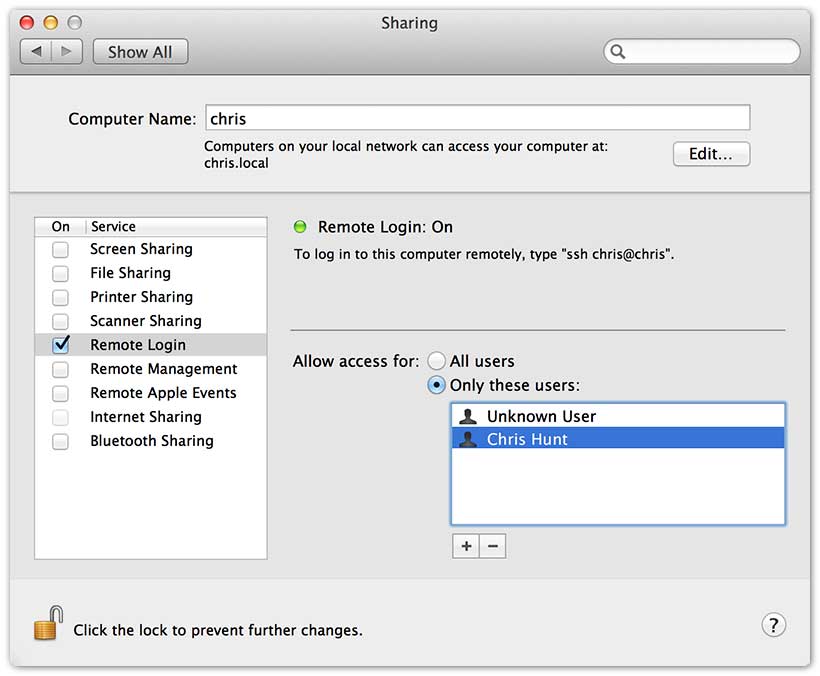
- a user called ‘pair’ that has SSH (a.k.a. Remote-Login on OS X) enabled
- an editor that works in the terminal :)
Positives
- The user does not have access to your files since they’re not SSHing in as you
- No need to install a system wide RVM or Ruby 1.9 for github-auth – this copies the
.ssh/authorized_keysinto your pair account - Besides creating a user, you can have a TMUX-ready pair session with a brand new pair ready in under 10 seconds.
- Automatically de-authorized the user once you’re done.
Negatives
- I wish it didn’t have to copy
authorized_keys– maybe it’s worth hacking to not requiregithub-auth? - It requires a sudo password – and can require it twice if your session goes on long enough.
- Currently, specific to OS X (/Users/, and the ‘staff’ group)
Anyway, I hope it’s useful to others as a simple way to set up your box for pairing.